Are you also one of those people who think that using a VPN slows down your internet? There are a lot of myths like this that keep circulating but aren’t exactly true. Many people think that their internet will slow down once they switch to VPN.
So, is that really the case? Maybe. It actually depends on multiple factors like server location, encryption strength and the quality of the VPN provider.
In this article, we’ll break down the myths related to VPNs and slow internet speed. Let’s dive in.
How Does a VPN Work?
A VPN works by adding an extra server between you and the internet. Whenever you open a website or any online content, it still gets downloaded to your device as usual. However, before reaching your device, the data passes through this extra server first.
Now, because of this additional step, many people think that using a VPN will slow down their internet, but that’s not entirely true. To actually test this, you can perform a speed test on your device. If you’re concerned about performance, you might want to consider options like Internet Monster, which can help you find the best internet plans that maintain your internet speed while providing security.
First, turn off your VPN and run an internet speed test. Then, turn on the VPN and again run the internet speed test. You might see a small drop in speed but that’s actually insignificant. In most cases the internet speed is similar in both cases.
Does a VPN slow down Internet speed? Myth vs. reality
In the past when VPNs were introduced, internet speed was not a priority. However, it has become one of the most prominent issues as everyone now wants a fast and reliable internet connection even with VPNs.
There are many different VPN protocols which offer different speeds. Many of the old VPNs are still extremely reliable but not in terms of speed. Is this still the case with the newer ones? Probably not.
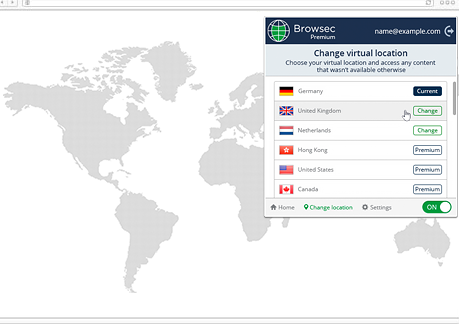
Currently, https://browsec.com/en/ is the best VPN which keeps the internet speed the same even while in use. You should definitely try it out if you’re looking for a budget-friendly option for personal or business use.
Are Current VPNs Faster? Why
The major difference between the VPNs then and now is the use of VPN protocols. As time changed, the VPN protocols got better with speed and privacy as top priority. Currently protocols such as WireGuard are being used by many VPN providers to offer faster and more private connections.
WireGuard uses faster encryption techniques and is designed to work across multiple processor cores at the same time. It was released in 2019 and is still being used after multiple updates. But the problem here is that the VPNs who use this service are all paid.
How Can a VPN Slow Down Your Internet?
There are two ways because of which your VPN can slow down the internet. These include:
Proximity
We often don’t think about how close a server is because internet speeds are usually fast enough that it usually doesn’t matter. However, physical distance between you and the server can actually affect how quickly data travels.
If the server you are connected to is far away, like using a VPN in Australia while you’re in France, can cause slight delays as the data has to travel a much longer distance. This highlights the importance of choosing a VPN server that’s close enough.
Overload
Another cause of slow speeds is server overload. If too many people are using the same VPN server, it can get overwhelmed and slow down. This usually happens with most free VPNs as the number of users far exceeds the available servers.
You can fix this issue by using a budget-friendly paid VPN. These VPNs can handle the demand and provide better performance.
How to Make a VPN Faster?
You can make your VPN faster in a few ways, which are:
Switch to a Different Protocol
If you feel like the internet speed slowed down, switch between different protocols to see which one works the best. Simply find the option to change protocols under the settings tab to change it.
Change Server Location
Selecting a server closer to your location can make a big difference. You should try it out by switching to a nearby server for faster and better performance.
Adjust Your Firewall Settings
Firewalls and antivirus programs can also slow down your connection. You can get rid of it by adding your VPN to their exceptions or temporarily disabling them to check if the internet speed improves.
Use a Wired Connection
Wi-Fi can slow things down, especially with many devices connected. If possible, switch to a wired connection if you want a better speed.
Summing Up
VPNs can sometimes affect your internet speed, but not all the time. If you choose the right protocol and use a reliable VPN provider like Browsec VPN, you can maintain a fast and secure connection all the time. Remember, free VPNs often come with limitations, so it’s better to invest in a premium service to get the best speed and security.
